TradingView Black Friday 2026: Up to 80% Off, Free Month & Best Plan to Buy

Last updated: November 18, 2026 | Trading Turtle
TradingView Black Friday 2026 begins November 23, offering up to 80% off eligible annual subscriptions plus one additional month free. The promotion continues through Cyber Monday, ending December 1, 2026, Pacific Time.
For traders who already use TradingView for chart analysis, technical indicators, market screening or price alerts, this could be an opportunity to reduce the cost of a paid subscription.
But the biggest discount does not necessarily mean the best purchase.
TradingView offers several subscription tiers, and the differences go well beyond the number of indicators on a chart. Your decision should depend on how you trade, which features you actually use and how much you are comfortable spending on charting software.
This guide explains the confirmed 2026 offer, compares the free and paid plans, examines the costs that are easy to overlook, and helps you decide whether upgrading makes practical sense.
Affiliate disclosure: Trading Turtle participates in the TradingView Partner Program. We may earn a commission when an eligible reader purchases through our affiliate link, at no additional cost attributable to that commission. Our recommendations are based on the usefulness of the features, not on the commission paid.
View the official TradingView Black Friday 2026 offer
TradingView Black Friday 2026: Key Details
TradingView has announced its 2026 Black Friday and Cyber Monday promotion for annual subscription plans.
| Offer detail | Confirmed information |
|---|---|
| Black Friday promotion | November 23–27, 2026 |
| Cyber Monday promotion | November 28–December 1, 2026 |
| Maximum advertised discount | Up to 80% |
| Additional benefit | One extra month free |
| Applicable plans | Eligible annual subscriptions |
| Official destination | TradingView Black Friday page |
| Exact plan-by-plan pricing | To be confirmed when the sale begins |
The advertised offer should not be interpreted as an 80% discount on every subscription tier. The exact saving will depend on the plan and the price displayed at checkout.
When does the TradingView Black Friday sale start in India?
TradingView has scheduled the campaign to begin at 12:00 AM Pacific Standard Time on November 23.
For Indian users, that translates to 1:30 PM IST on November 23, 2026.
The advertised end of the Cyber Monday campaign is 11:59 PM Pacific Standard Time on December 1, corresponding to approximately 1:29 PM IST on December 2.
These timings are based on the schedule TradingView communicated to partners. Check the official countdown and checkout for any updates.
You do not need to be a professional trader to consider the promotion. However, whether a paid subscription is worthwhile depends much more on your workflow than on how large the discount appears.

Visit TradingView Official Website
The promotion begins November 23. Individual plan discounts and final checkout prices should be verified on TradingView when the sale goes live.
What Is TradingView, and What Do Paid Plans Actually Add?
TradingView is a charting and market-analysis platform used for studying stocks, cryptocurrencies, forex, futures and other financial instruments.
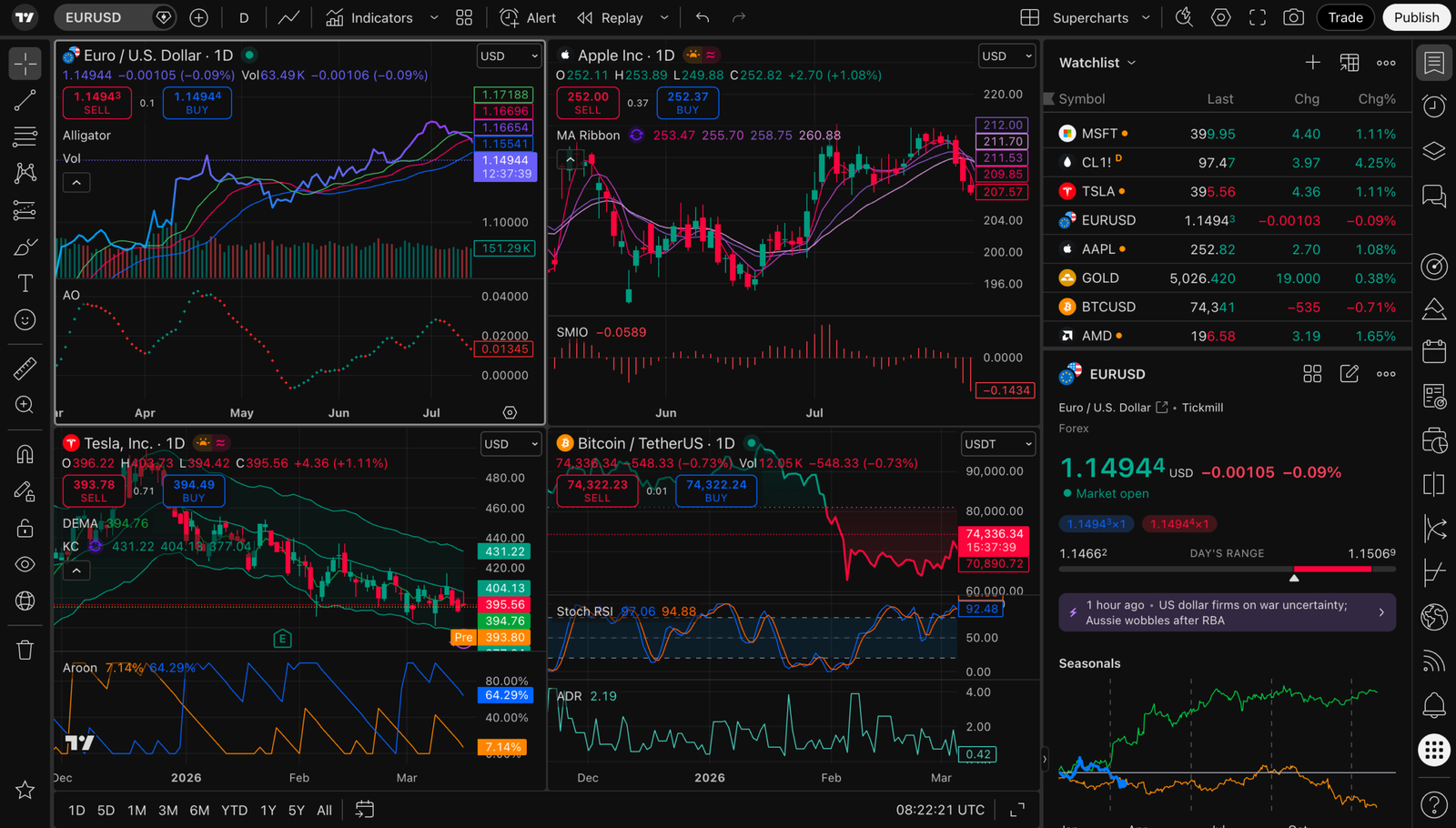
Its main appeal is the ability to organize market analysis in one environment. Users can examine price action, apply technical indicators, draw important price levels, build watchlists, configure alerts and explore trading ideas.
The free Basic plan already provides useful charting capabilities. You can study price movements, identify support and resistance, draw trendlines and work with a limited number of indicators.
Paid plans expand the available capacity and unlock additional functionality, including more chart layouts, additional alerts and advanced analysis tools.
That distinction matters.
A trader using one chart, two indicators and a handful of drawing tools may have little reason to pay. Someone monitoring multiple markets with dozens of alerts could face practical limitations on the free plan.
Paying for TradingView does not make a trading strategy profitable. The benefit is primarily better access to tools, more charting capacity and a potentially more efficient research workflow.
TradingView Free vs Essential vs Plus vs Premium vs Ultimate
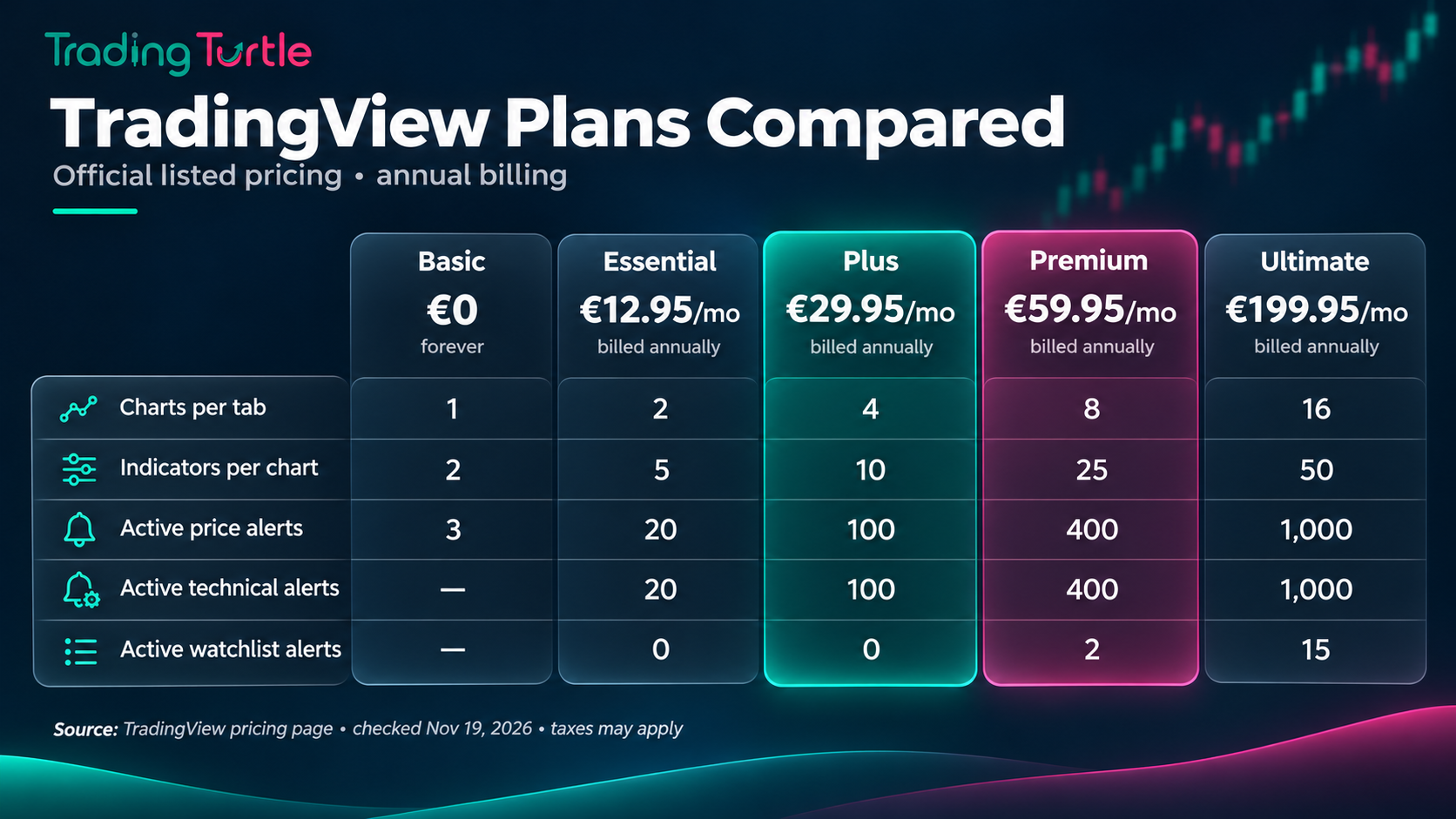
TradingView currently offers five main tiers: Basic, Essential, Plus, Premium and Ultimate.
The following comparison uses the platform’s publicly listed feature allocations. It is not a Black Friday pricing table.
| Feature | Basic | Essential | Plus | Premium | Ultimate |
|---|---|---|---|---|---|
| Charts per tab | 1 | 2 | 4 | 8 | 16 |
| Indicators per chart | 2 | 5 | 10 | 25 | 50 |
| Active price alerts | 3 | 20 | 100 | 400 | 1,000 |
| Active technical alerts | — | 20 | 100 | 400 | 1,000 |
| Active watchlist alerts | — | — | — | 2 | 15 |
| Ad-free charting | No | Yes | Yes | Yes | Yes |
Source: TradingView’s official pricing and feature comparison. Feature limits and availability can change.
The most meaningful upgrades for many traders are not the headline indicator limits. They are the number of charts visible together and the ability to maintain alerts across multiple symbols.
For example, a swing trader following 30 stocks might want alerts at major support, resistance and breakout levels. A short-term crypto trader monitoring several pairs may want more chart panels and technical conditions.
These are different workflows, and they may justify different plans.
TradingView Basic: Who Should Stay on the Free Plan?
Basic is sufficient for many beginners and occasional market participants.
If you mainly analyze a few assets, study market structure and place trades through a separate broker, the free plan can cover the essential tasks.
A simple approach using candlesticks, moving averages, trendlines and horizontal price levels does not necessarily require a paid charting platform.
Basic becomes more restrictive when you want several simultaneous charts, additional indicators or numerous active alerts.
Our view: Learn to use the free tools properly before paying for more features. If you rarely encounter the plan’s limits, staying on Basic is a sensible decision.
TradingView Essential: A Practical First Upgrade
Essential is the entry-level paid subscription.
It provides two charts per tab, five indicators per chart and 20 active price alerts, alongside 20 technical alerts.
That represents a meaningful increase from Basic without committing to the capacity offered by the higher tiers.
Essential may suit traders who:
- Regularly analyze a small group of stocks or cryptocurrencies.
- Want separate charts for different timeframes.
- Need alerts for several technical levels.
- Prefer an ad-free charting environment.
Consider someone following Bitcoin and Ethereum on daily and four-hour charts.
They could use two chart panels to compare market structure without constantly changing symbols or timeframes. A modest collection of alerts could monitor important zones while they focus on other work.
For this type of routine, Essential may be enough.
Our view: Essential deserves consideration as the first paid upgrade, particularly for users who know exactly where Basic is restricting them.
TradingView Plus: Better for Traders Monitoring Multiple Markets
Plus increases chart and alert capacity considerably.
It supports four charts per tab, 10 indicators per chart, 100 active price alerts and 100 technical alerts.
This can be useful for active traders who monitor several stocks, crypto pairs or timeframes simultaneously.
Imagine a trader maintaining watchlists for Indian equities, Bitcoin, Ethereum and selected global indices.
They may want different chart layouts for trend analysis, intraday structure and higher-timeframe confirmation. They could also set alerts at predefined technical levels rather than constantly watching every chart.
Plus provides more room to organize that process.
However, not everyone needs 100 alerts or four simultaneous charts. If these features are unlikely to be used, paying extra merely because a larger discount is advertised would not be justified.
Our view: Plus could be a balanced choice for active retail traders whose daily workflow has genuinely outgrown Essential.
The promotion begins November 23. Individual plan discounts and final checkout prices should be verified on TradingView when the sale goes live.
TradingView Premium: More Capacity for Complex Workflows
Premium expands the limits to eight charts per tab, 25 indicators per chart, 400 active price alerts and 400 technical alerts.
It also provides additional capabilities, such as watchlist alerts and a larger historical bar allowance than the lower paid tiers.
This level of capacity could matter for traders who monitor extensive watchlists, maintain multiple strategies or depend heavily on technical alerts.
For instance, a systematic trader studying dozens of securities might organize charts by setup type, trend condition and trading timeframe.
Rather than switching repeatedly between individual charts, the trader could maintain several analysis layouts and use alerts to identify situations requiring attention.
But higher capacity can introduce another problem: complexity.
A chart filled with indicators does not automatically provide a stronger signal. It can obscure price action and create conflicting interpretations.
Our view: Premium makes sense when specific features support an established workflow. It is harder to justify for someone who trades only a few instruments and has no need for advanced alert capacity.
TradingView Ultimate: Specialist and Professional Use
Ultimate is TradingView’s highest main subscription tier.
It supports up to 16 charts per tab, 50 indicators per chart, 1,000 active price alerts and 1,000 technical alerts.
These limits are designed for substantially more demanding analytical use.
Ultimate may be relevant to professional or highly specialized workflows involving numerous charts, large watchlists and complex monitoring requirements.
However, ordinary retail traders are unlikely to need that capacity. The annual financial commitment may also remain substantial even after a promotional discount.
TradingView’s pricing documentation additionally distinguishes professional users from non-professional users, so anyone operating in a professional market-data capacity should verify the applicable subscription and licensing terms.
Our view: Ultimate should be evaluated against specific operational requirements, not simply because it carries the highest advertised discount.
TradingView Plus vs Premium: Which One Is Worth Buying?
For many active retail traders, Plus and Premium will be the most relevant plans to compare.
The difference is not simply about accessing more indicators.
Plus already provides four charts per tab, 10 indicators per chart and 100 price alerts. That can support a substantial personal trading routine.
Premium doubles the number of charts per tab to eight, raises the indicator limit to 25 and increases the price-alert allowance to 400. It also provides watchlist alerts and greater historical charting capacity.
The decision becomes easier when framed around specific needs.
Choose Plus when you monitor a manageable number of instruments and need a flexible multi-chart workspace without extensive automation or large alert volumes.
Consider Premium when your research regularly involves larger watchlists, multiple concurrent chart layouts or advanced alert requirements that Plus cannot accommodate.
A useful test is to write down the three features you would immediately use after upgrading.
If you cannot identify them, you may not need the higher plan.
How Much Can You Actually Save During Black Friday?
The promotional headline is attractive, but the percentage discount alone is insufficient to determine the value of a purchase.
TradingView has announced savings of up to 80% on eligible annual subscriptions, along with one extra month.
The exact Black Friday prices for individual tiers should be taken from the official sale page when it becomes active.
When comparing subscriptions, look at four figures:
- The final amount payable today.
- The total subscription period.
- The effective monthly cost across that period.
- The renewal amount and billing conditions after the promotional term.
How to calculate the effective monthly cost
If an eligible offer provides 13 months of service, the calculation is:
Effective monthly cost = Total promotional payment ÷ 13
For illustration only, suppose a hypothetical plan costs $130 for 13 months.
The effective cost would be $10 per month.
That example is not a quoted TradingView Black Friday price.
A more complete comparison also includes taxes, payment charges where applicable, additional market-data fees and what the subscription will cost when it renews.
For a trader who only needs charting a few times each month, even a discounted annual subscription might represent unnecessary spending.
For someone who consistently uses paid features, an annual discount may provide more measurable value.
Five Things to Check Before Purchasing
1. Renewal pricing
TradingView subscriptions generally renew automatically unless the user cancels the renewal.
The promotional amount charged today should not be assumed to continue indefinitely.
Before purchasing, inspect the renewal information presented in the order summary and account billing settings.
If you only want the promotional term, understand the cancellation procedure and keep a record of the next billing date.
2. Whether the offer applies to your account
New customers, existing subscribers and users with active promotional plans may see different available purchase or subscription-management options.
An existing annual subscriber may also face restrictions when attempting to extend or modify their current plan.
Do not assume that a promotional price can be applied to every account configuration.
Check the offer while signed in and review the final checkout conditions.
3. Real-time market-data fees
A paid TradingView plan does not automatically guarantee access to every exchange’s real-time data.
Certain exchange feeds can require separate market-data subscriptions or permissions.
This matters for traders using exchange-specific information, especially when analyzing instruments where data accuracy and timing are important.
Check the available feeds and any additional charges for the markets you trade.
4. Taxes and regional pricing
TradingView may apply relevant taxes depending on the customer’s location.
Indian users should verify the actual currency, taxes and total payment displayed at checkout rather than relying on a US-dollar promotional illustration.
A discount percentage may be identical while the final local-currency amount differs.
5. Refunds and cancellation terms
TradingView’s published pricing FAQ states that qualifying annual-plan refunds must be requested within 14 calendar days of payment. It also lists exclusions, including monthly subscriptions, certain upgrades and market-data purchases.
Cancellation and refund eligibility are different matters.
A subscription that has been canceled may remain available until the end of its paid term, without automatically entitling the customer to a refund.
Read the official TradingView subscription policies before placing an order.
Can You Combine the $15 Referral Coupon With the Black Friday Discount?
TradingView’s Partner Program describes a $15 coupon benefit associated with qualifying referrals.
However, the benefit should not be confused with an instant additional $15 discount on the Black Friday checkout.
TradingView describes the coupon as a benefit toward a subsequent eligible subscription purchase, subject to its conditions.
Its help documentation also explains that promotional coupons generally cannot be combined with another special discount.
That means users should not assume that the Black Friday discount and the $15 coupon can be stacked.
The safest approach is to compare the official offer displayed for your account, review coupon eligibility separately and avoid relying on claims of an additional discount that TradingView has not confirmed.
Is TradingView Black Friday 2026 Worth It for Indian Traders?
For Indian stock-market participants, the value of TradingView depends on how the platform fits into their existing trading setup.
An investor who checks a handful of NSE-listed stocks each week might be comfortable with the free version and their broker’s native charts.
A more active swing trader could benefit from additional alerts and multi-chart layouts, particularly when monitoring multiple sectors or technical setups.
An intraday trader may place greater importance on chart organization, timeframe flexibility and reliable access to the required market data.
Before subscribing, consider whether your broker already provides the tools you need.
Paying for a second charting service makes sense only when it provides capabilities or usability improvements that justify the cost.
Also verify the precise exchange-data coverage you require. TradingView’s platform subscription and the market-data arrangements for individual exchanges are not necessarily the same product.
What about Indian stock-market beginners?
For beginners, our preference is straightforward: focus first on understanding risk, price structure, position sizing and the mechanics of the market.
A large collection of indicators can make a chart look sophisticated without improving the decisions made from it.
If you are still developing a repeatable approach, spend time learning on Basic before buying additional capacity.
What about crypto traders?
Crypto traders may find TradingView especially useful when comparing multiple trading pairs, exchanges and timeframes.
Features such as alerts, multi-chart layouts and technical indicators can help organize market observation.
However, charting software cannot eliminate liquidation risk, excessive leverage or the possibility of unexpected volatility.
An alert also does not guarantee that an order will execute at the desired price.
If you use futures or other leveraged instruments, your risk-management process matters more than the subscription tier.
A Practical Checklist to Decide Whether You Need an Upgrade
Before purchasing any TradingView plan, complete this exercise.
Step 1: Review your current workflow. Identify the assets and timeframes you study most often.
Step 2: List the limitations you encounter. Do you repeatedly run out of indicators, charts or active alerts?
Step 3: Choose the minimum sufficient tier. Match those actual constraints to the plan comparison rather than choosing the largest discount.
Step 4: Check the cost. Compare the final payment with the effective monthly value you expect to receive.
Step 5: Review renewal and market-data terms. Make sure the price displayed today does not obscure future costs.
Step 6: Keep your analysis simple. More charting capacity is useful only when it improves your process.
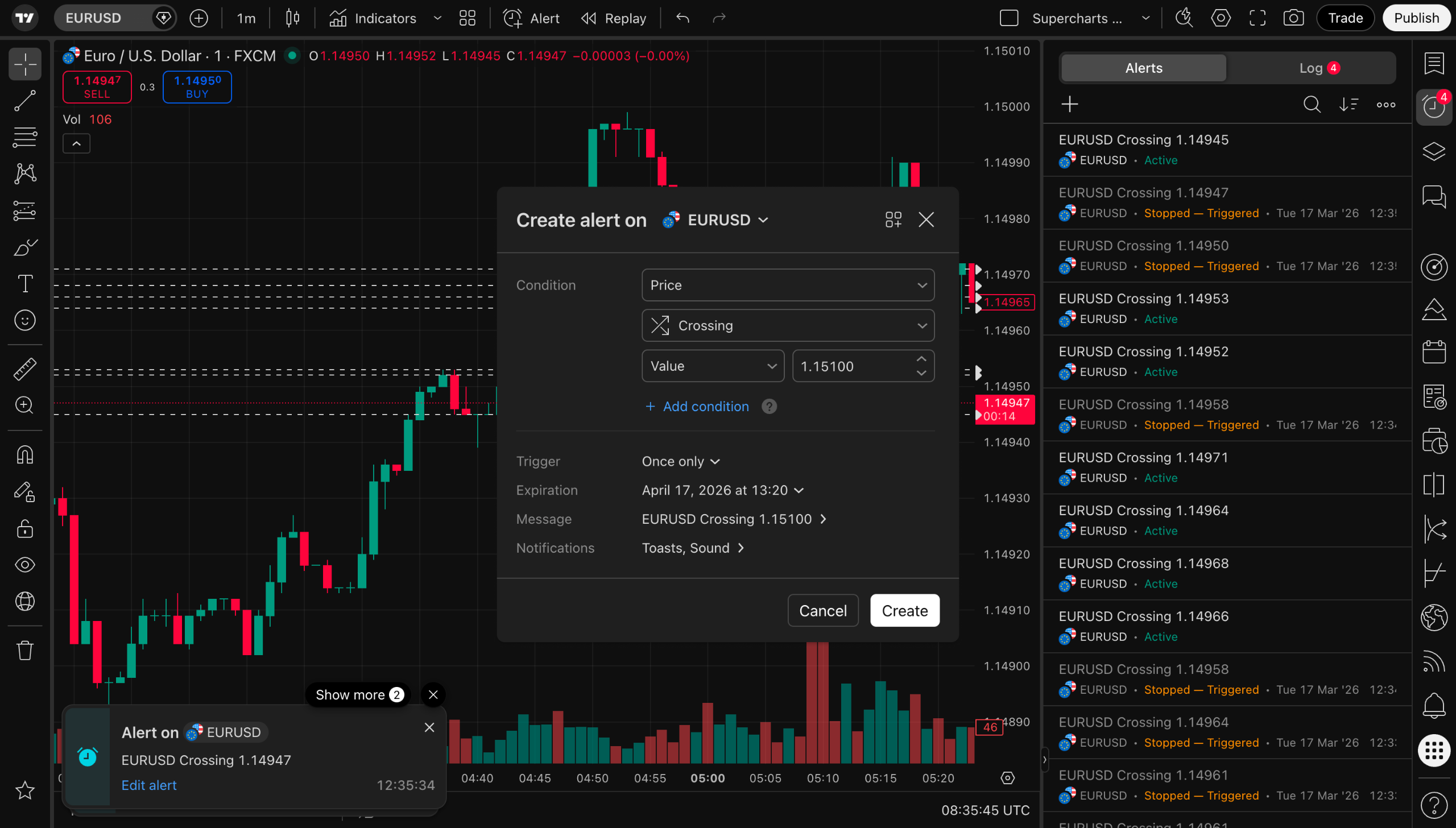
For readers who want to build a better alert workflow, our guide to setting up TradingView alerts explains the process in practical terms.
You can also explore Trading Turtle’s free trading tools to support risk planning and trading discipline without committing to another subscription.
How to Access the Official TradingView Black Friday 2026 Offer
The process is straightforward.
- Open the official TradingView Black Friday page.
- Sign in or create a TradingView account.
- Review the eligible plans and current promotional pricing.
- Compare the features with your own trading requirements.
- Check the total payment, renewal details and any additional fees.
- Complete the purchase only if the selected plan provides sufficient value.

Compare TradingView’s official Black Friday offers
Affiliate link. Trading Turtle may receive a commission from eligible purchases.
Avoid third-party websites promising unusually large additional discounts, unauthorized coupon stacking or guaranteed access to paid subscriptions.
For payment security and reliable subscription management, complete the transaction through TradingView’s official website.
Final Verdict: Which TradingView Plan Should You Buy?
TradingView Black Friday 2026 offers a useful opportunity for traders who have been considering a subscription, but a discount alone is not a reason to upgrade.
For beginners and occasional chart users, Basic remains a sensible starting point.
For traders who need additional charts and alerts without considerable complexity, Essential may offer enough functionality.
For active retail traders maintaining several charts and watchlists, Plus is a practical tier to evaluate.
Premium becomes more relevant when larger-scale market monitoring, extensive alert configurations and additional specialist tools support a consistent analytical routine.
Ultimate is harder to justify without demanding operational needs.
The best plan is not necessarily the most expensive one or the one with the highest percentage discount. It is the least expensive plan that reliably supports the way you actually trade.
If you have identified a genuine need for paid features, the official Black Friday promotion is worth comparing against regular subscription prices before making a decision.
View TradingView Black Friday 2026 deals
Affiliate disclosure: Trading Turtle may earn a commission from eligible purchases through this link. This does not influence the recommendations in this guide.
Frequently Asked Questions
The announced promotion runs from November 23 through December 1, 2026, Pacific Time. It includes Black Friday and the subsequent Cyber Monday promotion.
TradingView has announced up to 80% off eligible annual subscriptions plus one free month. The exact discount varies by plan and should be verified on the official sale page when the campaign begins.
Yes. TradingView’s 2026 partner announcement includes one additional month free with its eligible Black Friday annual-plan offers. Review the checkout to confirm the term applied to your selected plan.
A beginner may not need either. The free Basic plan can be sufficient for learning chart analysis. If a paid upgrade becomes necessary, compare the actual chart and alert limits before deciding between Plus and Premium.
Available upgrade and extension options may depend on the account’s current subscription status. Existing subscribers should sign in and verify the offers and billing terms available to their accounts.
Indian users can review the promotional offer through TradingView’s website. Available payment methods, prices, taxes and specific eligibility conditions should be confirmed at checkout.
Do not assume all exchange data is included. Some real-time market feeds may require separate subscriptions or permissions, depending on the exchange and instrument.
TradingView’s coupon guidance generally does not permit stacking a coupon with an existing special discount. The referral coupon is subject to its own terms and should not be advertised as an automatic extra saving on the promotional purchase.
Do not assume it will. Review the renewal amount and subscription conditions before paying. Promotional prices and later recurring charges may differ.
Trading Turtle provides independent financial-market education and research. This article discusses charting software and subscription features, not recommendations to buy or sell financial instruments. Platform features, promotional conditions and prices are subject to change. Always verify the latest information with TradingView before purchasing.